Before You Add to Cart: Sizing a Mouse to Your Actual Hand
The Spec Sheet Has a Blind Spot
Walk into any Best Buy, pull up any product page, and you'll be buried in numbers. 26,000 DPI. Eight programmable buttons. Seventy hours of battery. Two-point-four gigahertz wireless.
None of those numbers will tell you whether the thing fits your hand.
That's the odd gap in how we shop for mice. We treat them like graphics cards — comparing throughput and features — when the actual experience of using one for eight hours is closer to buying shoes. A shoe with a great sole and a lousy last is still a bad shoe. Same logic applies at your desk.
So before you spend another dollar on a mouse, spend four minutes measuring the hand that's going to hold it.
Measuring Your Hand at Home
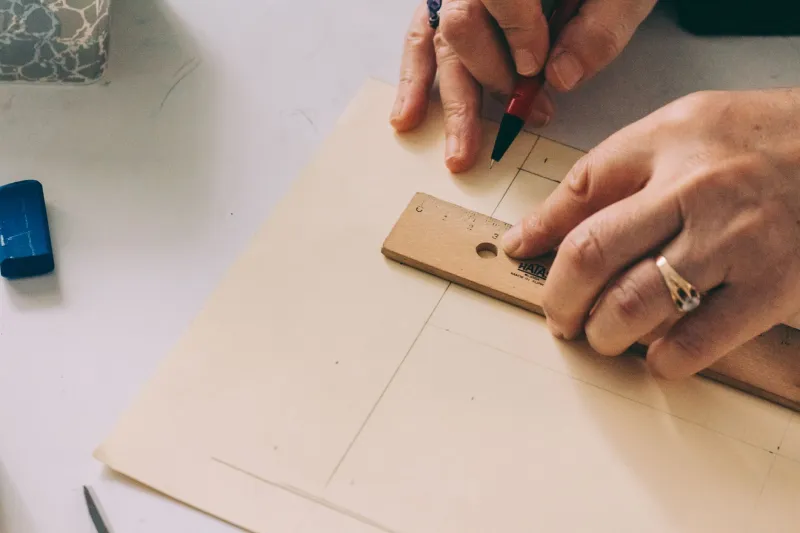
You need a ruler, a sheet of paper, and a flat surface. A soft tape measure works too, but a rigid ruler pressed flat is easier to read accurately.
Hand length. Place your palm down on the paper with your fingers together and relaxed — not stretched out, not curled up. Measure from the crease at the base of your palm (where the wrist bends) to the tip of your middle finger. Write it down in both inches and millimeters; most mouse specs are published in millimeters, and you'll want to compare apples to apples.
Hand width. Still palm-down and relaxed, measure straight across the widest part of your hand — usually the knuckles at the base of your fingers, just below where they bend. Again, both units.
Optional but useful: grip length. Curl your hand the way you naturally hold a mouse and measure from the crease of your palm to roughly where your fingertips sit. That number tells you how much of the mouse shell your fingers actually occupy.
Most adult hands land somewhere between 170 and 200 millimeters long and 80 to 100 millimeters wide. If you're at the edges of that range — notably small or notably large — the mismatch problem is worse, and the measurements matter more.
Three Grips, Three Different Fits
Hand size alone doesn't decide anything. What you do with the mouse matters just as much.
Palm grip
Your whole hand rests on the mouse, fingers flat, wrist anchored. This is the grip most people default to and the one that benefits most from a shell that fills your palm. Ideally, the mouse's length should be close to your hand length minus a small margin — think 80 to 90 percent. A palm-grip mouse that's too short forces your fingers to curl unnecessarily; one that's too long pushes your wrist into an awkward angle at the desk edge.
Claw grip
Your palm touches the back of the mouse, but your fingers arch up over the buttons like a claw. Contact points are the palm heel and the fingertips. Claw grippers generally want a mouse in the middle of their size range — long enough to support the palm, but with a hump placed toward the rear so the fingers stay arched. Too tall a hump and the hand flattens out; too flat and the grip collapses into a fingertip hold.
Fingertip grip
Only your fingertips make contact; the palm hovers. This grip wants a shorter, lighter mouse — a long shell gets in the way and pushes your hand backward. Fingertip grippers are also the most sensitive to width, since a wide mouse splays the fingers out and kills the precision they're chasing in the first place.
If you're not sure which one you use, watch your hand for thirty seconds while you scroll through email. Most people fall into a hybrid, which is fine — just lean toward the grip you use when you're concentrating, not the one you use when you're idly reading.
Matching Numbers to Product Listings
Here's the frustrating part: US retailers rarely publish the dimensions you need in a clean format. Amazon listings sometimes include them in a bullet, sometimes in an image, sometimes nowhere. Best Buy product pages are more consistent but still spotty. Manufacturer sites are usually the best source, and even they sometimes list depth instead of length.
What you want, at minimum:
- Length (front edge to rear edge, in millimeters)
- Width at the widest point
- Height at the highest point of the hump
As a rough starting point, compare your hand length to the mouse length. If your hand is 185 millimeters and the mouse is 120, you're at about 65 percent — a short mouse. If the mouse is 130, you're at 70 percent. Somewhere in the 75 to 85 percent band tends to suit palm grips; shorter ratios suit fingertip grips; claw grippers sit in between.
Width is easier. A mouse under 60 millimeters wide is narrow; 60 to 70 is average; over 70 is wide. If your hand measures 90 millimeters or more across the knuckles, a narrow mouse will feel like gripping a pencil all day. If you're at 80 or below, a wide mouse will splay your fingers and slow you down.
Height is the underrated one. Tall humps fill the palm and reduce how much your fingers have to do; low humps give you room to move from the wrist. Neither is better, but one will feel wrong to you within ten minutes.
Why Shape Still Beats Numbers
A caveat worth stating plainly: dimensions are a filter, not a verdict. Two mice can share identical length, width, and height and feel completely different because of where the hump sits, how the sides taper, and whether the widest point is near the front or the back.
Use the measurements to build a shortlist — three or four candidates instead of thirty — and then let your hand do the deciding. If you can't try before buying, buy from a retailer with a generous return window and keep the packaging intact for the first week. Here in the US, most big-box stores give you fifteen to thirty days, which is plenty of time to notice whether your forearm is complaining by Friday afternoon.
The Four-Minute Habit
Measuring your hand once is enough — the number doesn't change. Write it down somewhere you'll find it again, along with your preferred grip and whether you lean toward tall humps or low ones. Next time you're comparison shopping, you'll skip the twenty-minute scroll through reviews and go straight to the listings that could plausibly fit.
It won't make mouse shopping fun. But it will make it a lot less like guessing.