The Blind Spot on Your Desk Is Horizontal
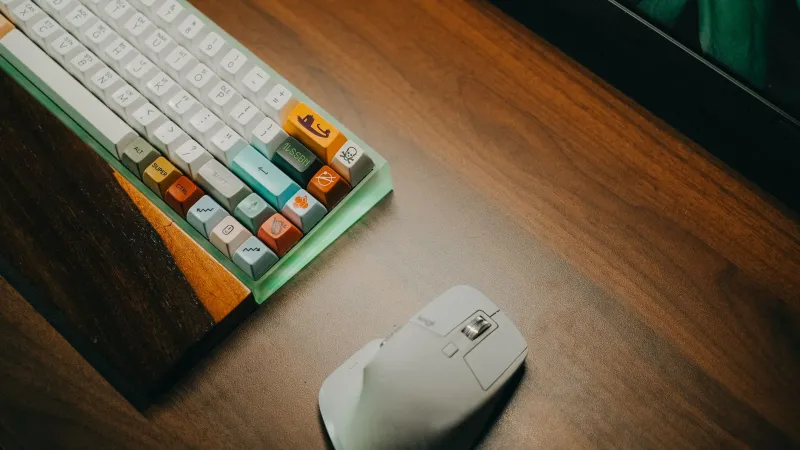
Remote work has a way of turning small desk habits into all-day physics experiments. You notice the mouse because your hand is on it. You notice the wrist rest because you bought it. You probably do not notice the horizontal distance between your keyboard and your mouse, even though your shoulder has been doing math with it since 9 a.m.
That gap is the blind spot. We tend to obsess over cursor speed, grip style, and whether a mouse is “ergonomic” enough, while the real culprit may be that the mouse is sitting two or three inches farther to the side than your arm wants it to be. Those inches do not feel like much in the moment. Over a full workday, they add up to a lot of reaching, shrugging, and leaning.
Why your mouse shoulder starts complaining
When your mouse sits far to the right of the keyboard, your right arm has to travel outward to use it. Your upper arm drifts away from your torso, your shoulder blade starts to wing out a little, and your elbow loses its comfortable spot near your ribs. None of that is dramatic. It is just a low-grade reach you repeat hundreds of times without thinking.
The wrist gets blamed because it is the part that touches the mouse. But a wrist rest cannot fix a shoulder that is holding your arm out to the side. If anything, a plush wrist rest can make the setup feel more official while the real strain stays upstream.
Left-handed workers get a mirror-image version of the same problem, especially if they were trained to use a right-handed mouse and never switched back. The reach is still a reach, just on the other side of the desk.
The two-minute reach test
You do not need a specialist, an app, or a new mouse to check this. You need a tape measure and about two minutes.
- Sit the way you normally sit when you are actually working, not the way you sit for a posture photo. Feet flat, screen at a reasonable height, hands on the keyboard home row.
- Let your arms hang naturally for a second, then bring your hands back to the desk. Notice where your right hand wants to land when your elbow stays close to your body. That spot is your honest mouse zone.
- Put the mouse there. Not where the desk has empty space. Not where it has always lived. Where your hand falls without your shoulder moving forward or up.
- Measure the gap from the edge of your keyboard to the center of the mouse. A couple of inches of clearance is normal. A mouse parked out beyond the number pad, a notebook, and yesterday’s coffee mug is not.
- Check the angle of your forearm. If it is sweeping outward like you are pointing at something across the room, the mouse is too far away. If your elbow has to leave your side to reach it, same conclusion.
- Shrug your shoulders, then relax them. If using the mouse makes one shoulder creep up again, that is your tell.
The test is not about hitting a perfect number. It is about catching the moment your body starts compensating. Two inches might be fine for one person and too much for another, depending on desk height, keyboard width, and how long the workday runs.
Why the extra inches beat the fancy wrist rest
A wrist rest supports the wrist. It does not shorten the distance your arm has to travel. A mouse with a sculpted shape can be genuinely comfortable, but it cannot undo a desk layout that puts it in the wrong place.
Horizontal reach also tends to sneak past people because it does not hurt immediately. It shows up later as a tired shoulder, a stiff upper back, or a vague feeling that you cannot get comfortable in your chair. Then we buy another mouse, another pad, another gadget. The cheaper move is to slide the mouse inboard and see whether the complaint changes.
This is also why two people can own the same mouse and have completely different experiences. One has it tucked close to the keyboard. The other has it exiled to the far side of a full-size keyboard and a stack of mail. The mouse is not the variable. The reach is.
The no-cost desk repositioning plan
Start with the keyboard, not the mouse. Center the part you actually type on with your screen. On a full-size keyboard, that often means the letter keys line up with your nose while the number pad hangs off to the right. You do not need to center the entire plastic slab if doing so pushes your mouse into the next time zone.
Next, clear the mouse side of the desk. Move the mug, the phone, the notebook, and the random charging cable. A mouse needs a landing pad, not a obstacle course.
Then put the mouse just outside the keyboard, roughly level with the home row. You want your forearm to stay relaxed and your elbow to remain near your torso. If your desk is narrow, try a slight keyboard angle only if it does not twist your torso. Do not turn your whole setup into a diagonal just to make room.
For right-handed setups, the goal is simple: mouse close, shoulder down, elbow in. For left-handed setups, mirror it. If you are ambidextrous, this is a good excuse to keep a second mouse on the other side and alternate. If you are not, do not force a switch mid-project and expect magic. Just fix the reach on your dominant side first.
Finally, use the keyboard more. Learn a few shortcuts for the tasks you repeat most, and use arrow keys or page keys when they are faster than a mouse trip. This is not about becoming a shortcut evangelist. It is about reducing the number of times you launch your arm sideways for something that did not require it.
What not to do
Do not overcorrect by jamming the mouse against the keyboard until your hand is cramped. Do not stack books under your mouse to raise it unless you have checked the height and your wrist stays neutral. Do not assume a wrist rest will cancel out a bad reach. And do not ignore persistent pain. Desk tweaks are useful, but they are not medical care.
The bottom line
Your mouse does not need to be fancy to be comfortable. It needs to be within reach. Measure the gap, slide the mouse closer, clear the clutter, and give it a week. If your shoulder feels less like it has been holding a secret plank all day, you have found a cheaper upgrade than anything in your cart.
Two inches is not nothing. On a remote workday, it is a lot of unnecessary travel.