The Keyboard Is the Hidden Villain in Your Ergonomic Mouse Setup
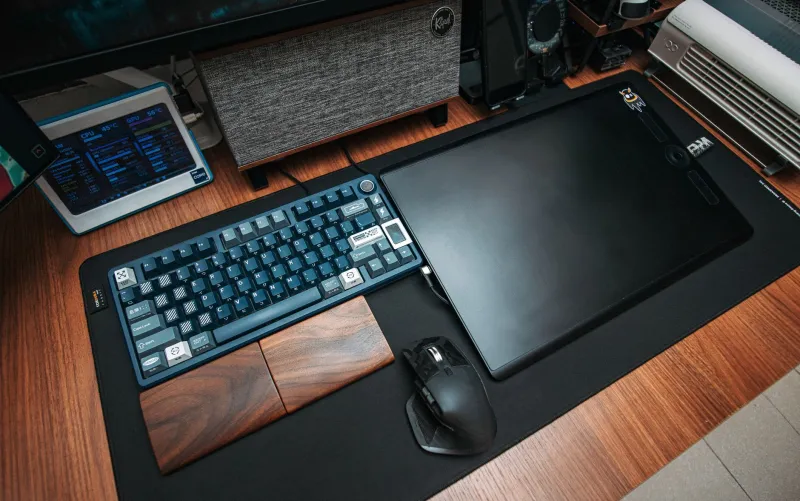
Ergonomic mouse reviews have a blind spot, and it is sitting right next to the mouse. We test the shape, the scroll wheel, the thumb rest, the sensor, the software. We take photos of a hand resting on a vertical mouse like it is a meditation retreat. Then we ignore the full-size keyboard that pushes that mouse six inches past the user's shoulder line.
In 2026, remote workers have more mouse options than ever. Vertical mice, trackballs, lightweight gaming shapes, split ergonomic designs, and cheap ambidextrous classics all compete for desk space. But a mouse review that does not account for keyboard width is only telling half the story. The keyboard is not a supporting character. It is the piece of furniture that decides where your mouse can live.
The Numpad Is Quietly Running Your Shoulder
A standard full-size keyboard is about 17 to 18 inches wide. Add a numpad and you have pushed the mouse zone to the right by roughly four to six inches compared with a compact board. For a right-handed worker, that means more shoulder abduction, more reach, and more tension through the upper back. You may not feel it in a five-minute product demo. You will feel it by 3 p.m. on a Thursday.
Most remote workers I know use the numpad for one thing: entering a password or a spreadsheet total. Then it sits there all day, occupying prime real estate like a guest who will not leave. I am not anti-numpad. Accountants, finance folks, and data-entry workers have a real case for one. But if you are a writer, project manager, designer, or developer who touches the numpad twice a week, your keyboard is making a postural decision for you.
Mouse Reviews Need a Reach Test
Here is the test I want every ergonomic mouse review to include: place the keyboard in its normal typing position, put the mouse beside it, and measure the horizontal distance from the center of the user's shoulder to the mouse. If the number grows when you swap in a full-size keyboard, the review should say so.
A mouse can have the perfect palm support and still be a bad purchase if it lives in the wrong zip code relative to your body. That is why two workers can buy the same vertical mouse and get opposite results. One has a compact keyboard and a mouse within easy reach. The other has a numpad, a 60-inch desk, and a shoulder that is slowly migrating toward the wall.
Compact Keyboards Change the Geometry
A tenkeyless board removes the numpad and buys back several inches. A 75% layout keeps the arrow keys and function row in a tighter frame. A 65% board trims more. A 60% board is tiny but demands more layers and shortcuts, which is its own trade-off.
For remote-work desks, a tenkeyless or 75% keyboard is often the sweet spot. You keep the keys most people actually use, and you move the mouse closer to your torso. If you need numbers, a separate numpad can live off to the left or in a drawer and come out when the spreadsheet demands it. That is a better compromise than letting unused keys dictate your shoulder position all day.
Shortcut Remapping Is Cheaper Than a New Mouse
Before you blame the mouse, count how often you reach for it when a keyboard shortcut would do. Closing a tab, switching apps, opening a new window, scrolling a page, and jumping between Slack channels can all happen without your hand leaving the keyboard. On Windows, learn Alt+Tab and Ctrl+Shift+T. On macOS, get comfortable with Command+Tab and Command+W. Use your mouse software or a tool like AutoHotkey on Windows or Shortcuts on macOS to build a few simple macros.
The less you reach, the less keyboard width matters. That does not excuse bad desk geometry, but it does mean you can reduce the daily load without buying a new board or mouse. The goal is not to avoid the mouse. It is to stop using it as a substitute for the keyboard you already own.
Mouse-Placement Zones for Normal Desks
Think in zones. The primary zone is within easy reach of your relaxed shoulder, roughly under your forearm when your elbow is near your ribs. The secondary zone requires a small reach but no lean. The far zone requires a shoulder stretch or a torso twist. Your mouse belongs in the primary zone.
On a typical 48- to 60-inch remote desk, that means centering the keyboard slightly left of the monitor if you are right-handed, then placing the mouse just to the right of the board. If your keyboard is centered under the monitor and your mouse is parked beyond a numpad, you are working in the secondary or far zone all day. Move the keyboard, not just the mouse.
What I Want Reviews to Say Out Loud
A good ergonomic mouse review should mention the keyboard it was tested with. It should show the mouse in relation to the user's shoulder, not just in a hero shot. It should say whether the mouse works on a compact desk, whether it crowds a full-size keyboard, and whether the recommended position is actually reachable without a shrug.
The mouse matters. The shape matters. The sensor and scroll wheel matter. But the keyboard is the quiet co-author of your posture. Until mouse reviews treat keyboard width as part of the setup, buyers will keep swapping mice when the real problem is the 18-inch plank sitting between their hands and a neutral shoulder position.