Mythbusting Your Mouse: Seven Beliefs That Don't Hold Up at a Real Desk

Mouse advice spreads fast in remote-work Slack channels and Reddit threads. Some of it is useful. Some of it sounds reasonable until you actually try it at a desk for a week. In 2026, with more people working from home than ever, it's worth separating genuine ergonomic guidance from spec-sheet folklore. Here are seven mouse myths that quietly undermine remote desks—and what the evidence and practical testing suggest instead.
Myth 1: Higher DPI always means better precision
DPI, or CPI, is mostly a sensitivity measurement. A 26,000 DPI sensor looks impressive on a product page, but at normal desktop settings you're using a small fraction of that range. Precision comes from a consistent sensor, a comfortable grip, a clean tracking surface, and steady hand movement—not from a bigger number.
For most office work, 800–1,600 DPI is plenty. On a large monitor, some people prefer lower sensitivity and bigger arm movements; others like a faster cursor for dual-screen setups. Try a simple test: set two different sensitivities and select cells in a spreadsheet or crop a photo. The higher setting often feels twitchier, not more accurate. Specs sell mice; fit and control make them useful.
Myth 2: A vertical mouse cures all wrist pain
Vertical mice reduce forearm pronation by rotating your hand toward a handshake position. That can help some people feel less strain. It does not cure tendinitis, nerve compression, or a setup that forces you to reach. It can also shift load to the shoulder or thumb if the shape is wrong for your hand.
Treat a vertical mouse as one tool in a rotation, not a medical device. Fit matters enormously: a vertical mouse that's too small can make you claw, and one that's too tall can push your shoulder up. If you're buying online, use the return window. Discomfort in the first week isn't always a sign to quit, but sharp pain is.
Myth 3: Wrist rests are universally helpful
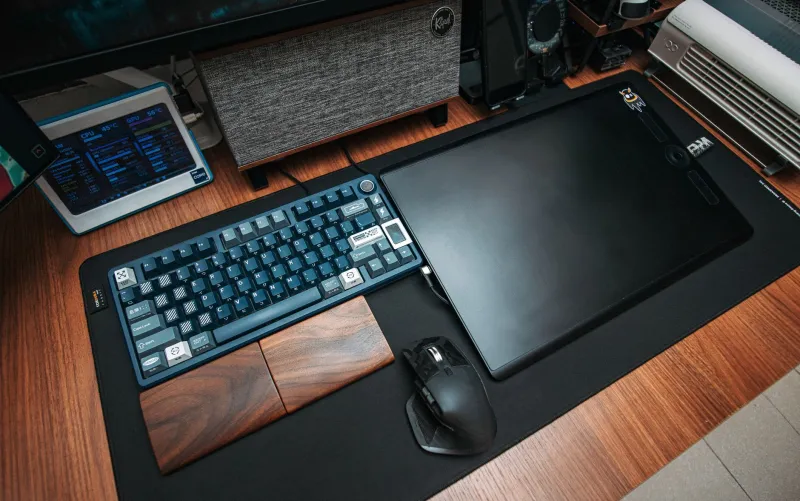
Wrist rests can support the heel of the hand during keyboard use, but with a mouse they can press into the wrist and encourage extension. That's the opposite of neutral posture. If a rest makes your hand feel pinned, tingly, or numb, take it away.
The goal is a neutral wrist and movement from the forearm, not a pad that locks you in place. A small gel rest can help some people during pauses, but it shouldn't become a permanent hand parking brake. Test yours for a day: if you forget it's there, fine. If you're pressing down to use it, it's probably not helping.
Myth 4: Wireless lag makes productivity impossible
Modern 2.4 GHz and Bluetooth LE office mice are fine for spreadsheets, email, and video calls. Latency is real, but it's usually measured in milliseconds. The bigger culprits are interference, a crowded USB hub, a low battery, or a cheap receiver tucked behind a metal monitor.
A wired mouse is still a sensible backup, and competitive gamers may notice differences. But wireless lag isn't the productivity killer it's made out to be. If your cursor stutters, move the receiver closer, try a different USB port, or replace the battery before blaming the entire wireless category.
Myth 5: Bigger mice equal better ergonomics
Size is about fit. A mouse that's too large forces your fingers to stretch; one that's too small encourages a claw grip. Hand length and width matter more than marketing photos. Measure from your wrist crease to the tip of your middle finger, then check manufacturer dimensions—not just product weight.
A sculpted mouse can feel great for one person and awful for another with a different hand shape. The best ergonomic mouse is the one you can hold with a relaxed grip, reach the scroll wheel without stretching, and use for an hour without wanting to shake out your hand.
Myth 6: Gaming mice make the best office mice
Gaming mice prioritize low weight, fast sensors, and simple shapes. Office work prioritizes comfortable shape, scroll wheel quality, multi-device switching, and enough buttons for shortcuts. A gaming mouse can work fine, but it isn't automatically better for a remote desk.
Some gaming shapes are too flat or too narrow for all-day use, and ultra-light shells can feel less stable for precise clicking. Conversely, a boring office mouse with a good arch and a quiet scroll wheel may beat a flashy gaming model for eight hours of spreadsheets. Match the tool to the task.
Myth 7: Price predicts comfort
A $20 vertical mouse can outperform a $150 flagship if it fits your hand. Returns, trial periods, and adjustability matter more than brand prestige. Budget-friendly 2026 setups are genuinely good, and spending more doesn't guarantee a better shape for your particular wrist.
Spend on fit and a return window, not on the most expensive sensor. Read reviews that mention hand size, grip style, and scroll wheel noise. If you can try a mouse in a store—or buy from a retailer with a generous return policy—do that before chasing a premium label.
What actually matters
Fit, neutral wrist posture, varied movement, and breaks matter more than any single spec. Try one change at a time: lower your DPI, remove the wrist rest for a day, or borrow a vertical mouse before buying. The most useful mouse advice is usually the least dramatic—and it rarely fits on a spec sheet.